Smart air conditioning is quickly becoming standard in Australian homes, and Mitsubishi Electric air conditioners are leading the way. Connecting your Mitsubishi air conditioner to Wi-Fi allows you to control temperature, modes, and schedules directly from your smartphone, even when you are not at home. This guide explains the full process in a clear and easy way.
Why Connect Your Mitsubishi Air Conditioner to Wi-Fi
When your Mitsubishi air conditioner is connected to Wi-Fi, you gain complete control over your home’s comfort. You can turn the system on before arriving home, adjust settings remotely, reduce energy waste, and monitor usage. Wi-Fi control is especially useful in Melbourne homes where weather changes quickly throughout the day.
Check If Your Mitsubishi Air Conditioner Supports Wi-Fi
Most modern Mitsubishi Electric split systems support Wi-Fi, but some models require an additional Wi-Fi adapter. Models such as MSZ-AP, MSZ-EF, MSZ-LN, and many ducted systems are compatible with MELCloud, Mitsubishi Electric’s official app. If your unit does not already have Wi-Fi enabled, a Mitsubishi Wi-Fi interface can be installed by a licensed technician.
What You Need Before Starting
Before connecting your air conditioner, ensure your home Wi-Fi is working properly and uses a 2.4GHz network, as Mitsubishi systems do not support 5GHz Wi-Fi. You will also need a smartphone or tablet, access to the App Store or Google Play Store, and the serial number of your Wi-Fi adapter if required.
Download the MELCloud App
MELCloud is the official Mitsubishi Electric control platform. Download the MELCloud app from the App Store on iPhone or Google Play Store on Android. Once installed, open the app and create a new account using your email address. After verifying your email, log in to continue the setup.
Put Your Air Conditioner Into Wi-Fi Pairing Mode
Turn on your Mitsubishi air conditioner using the remote control. Locate the Wi-Fi adapter on the indoor unit, usually behind the front panel. Press and hold the reset or connect button on the adapter until the indicator light starts flashing. This flashing light confirms the system is ready to pair with your Wi-Fi network.
Connect the Air Conditioner to Your Home Wi-Fi
Open the MELCloud app and select the option to add a new unit. The app will search for nearby Mitsubishi systems. When your air conditioner appears, select it and enter your home Wi-Fi name and password. Allow a few minutes for the system to connect. Once successful, the indicator light on the adapter will become solid.
Control Your Air Conditioner from Anywhere
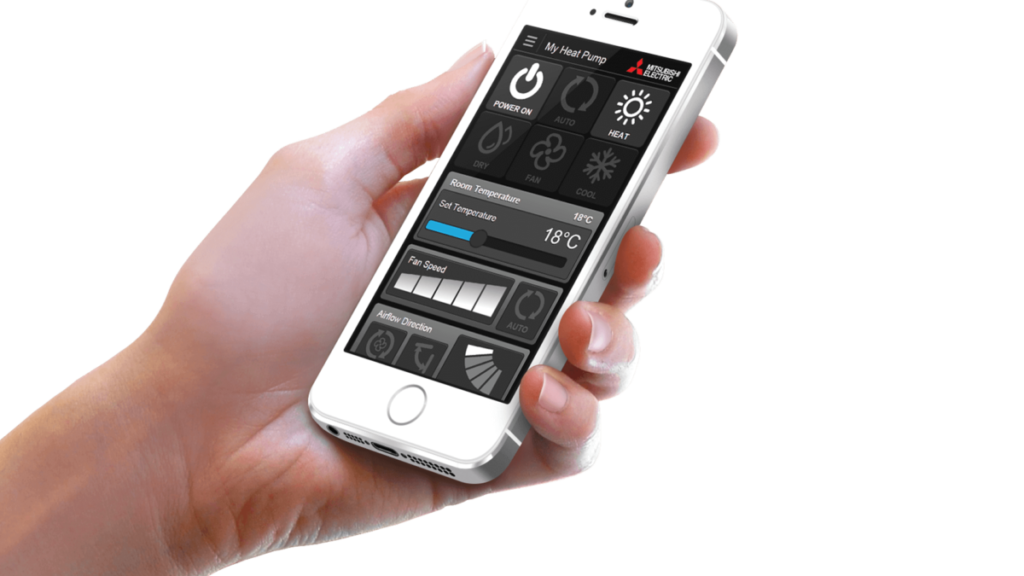
After connection, your Mitsubishi air conditioner will appear on the MELCloud dashboard. From here, you can change temperature, switch between heating and cooling, adjust fan speed, set weekly schedules, and monitor system performance. This gives you full control whether you are at work, travelling, or relaxing at home.
Common Connection Problems and Solutions
If the air conditioner does not connect, ensure your phone is connected to a 2.4GHz Wi-Fi network and not mobile data. Restart your router and reset the Wi-Fi adapter if needed. Make sure the Wi-Fi password is entered correctly. If problems continue, firmware updates or professional installation may be required.
When to Call a Professional
If your Mitsubishi air conditioner does not have a built-in Wi-Fi adapter or fails to connect after multiple attempts, a licensed technician can install or configure the system properly. Professional setup ensures stable connectivity and avoids future control issues.
Make Your Home Smarter with Zero Energy
If you want expert help connecting your Mitsubishi air conditioner to Wi-Fi or upgrading to a fully smart electric heating and cooling system, Zero Energy is here to help. Our team specialises in smart air conditioning, energy-efficient upgrades, and complete gas-to-electric solutions across Melbourne.